
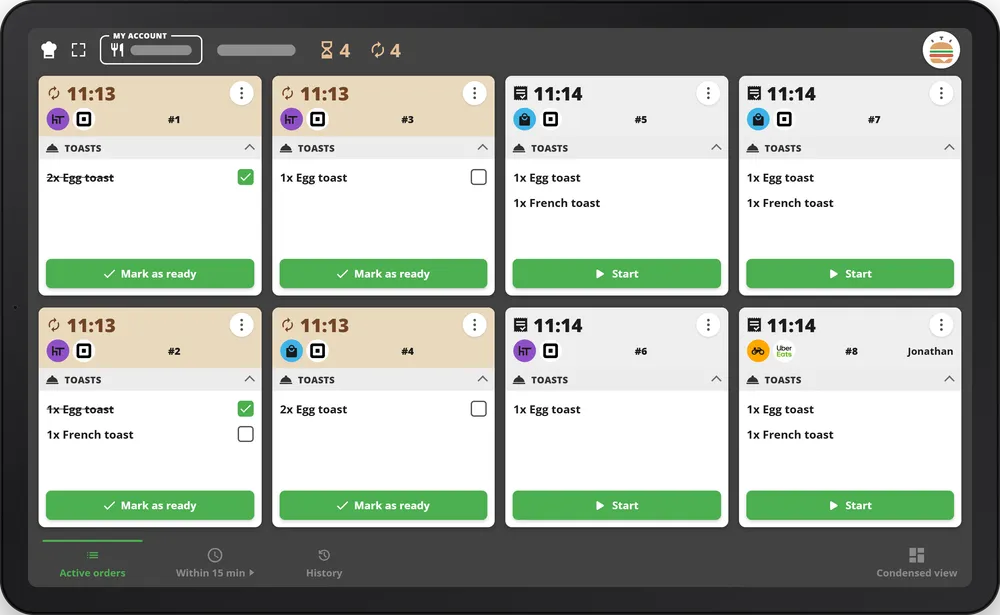
The kitchen display connected to your Square POS
Your orders flow automatically from your Square POS to your kitchen screens. No more paper tickets: a smoother, faster and error-free service.
+100 possible workflows
We're bound to have the feature you need 😁
System compatibility
TicknCook works just as well on Android, Windows or iOS
Orders displayed by urgency
TicknCook automatically sequences your orders by arrival time or urgency
Advanced statistics
Track the average preparation time of an order
Direct platform integrations
Retrieve courier data in real time, use the Uber Eats busy mode and much more directly from TicknCook thanks to our direct platform integrations.
Really save time with TicknCook KDS
Hundreds of restaurants rely on TicknCook every day to display and manage their orders in the kitchen.
Quick and easy to learn. It only takes a few hours to get a fully operational system that can run alongside your printers
Highly responsive support on WhatsApp. There is always a human available to answer you!
Whatever your needs and your type of restaurant, we promise to meet them 100%
15-day free trial, with no setup fees and no commitment.
Use TicknCook in less than 24 hours! Connect your Square account to TicknCook in a few clicks and we take care of the rest!
Need more information?
Want a demo?
We answer you directly on WhatsApp — click the button or scan the QR code with your phone.
Because at TicknCook we like to keep things simple and human ;)


FAQ
What are your prices?
29 euros (excl. VAT) per month and per screen! And if you take 2 screens, the third one is on us ;)
You get a 15-day free trial, and our offer is commitment-free!
How do I use TicknCook with Square?
After creating your TicknCook account (app.tickncook.com/sign-up), simply drop us a message on our WhatsApp and we will take care of the rest ;) Soon we will be directly available through Square marketplace.
Do you provide the hardware?
We don't! You need to source your own equipment. But we can help you with that! TicknCook runs on any tablet or touch screen with a browser and an internet connection.
Do I need an internet connection?
Yes, our system works with internet. If there is a short outage, no problem: we recover the orders that could not be displayed during the outage.
Can I print tickets directly from TicknCook?
Absolutely! You can print a paper ticket on your printer straight from TicknCook. We provide options for ticket printing on Zebra and Epson printers depending on your KDS hardware — for more information, see our detailed printer compatibility guide.
My business is seasonal, can I unsubscribe while I am closed?
Yes, we have set this up for many customers. Simply let our support know your closing dates on WhatsApp.
Can I easily reach you if I have a problem?
Very easily via our WhatsApp. No AI here: real humans answer you as soon as possible! Responsiveness and service are part of our DNA.