Log in
 Help
Help Contact
 English
 Français
 Español
A clear, simplified view of your orders to add drinks and desserts
The TicknCook counter screen was designed specifically for fast-food and quick-service environments, where speed and flow are essential. It gives a clear overview of orders, focused on the global status of each one. Thanks to smart filters by service type (takeaway, dine-in, delivery), your teams can track which orders are ready efficiently and without overload, for fast, error-free counter service.
Start your free trial
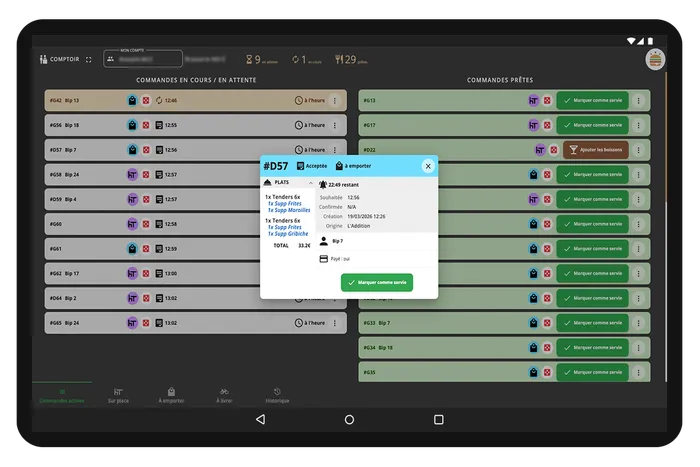
A clean interface built for speed:
because communication between kitchen and counter is essential!
The TicknCook counter screen shows you order status at a glance, with a dedicated column for ready orders to avoid confusion. A color scheme tells you where each order stands in the kitchen (being prepared, running late, etc.).
Prefer a more detailed order view for the final check before hand-over? That's possible too!
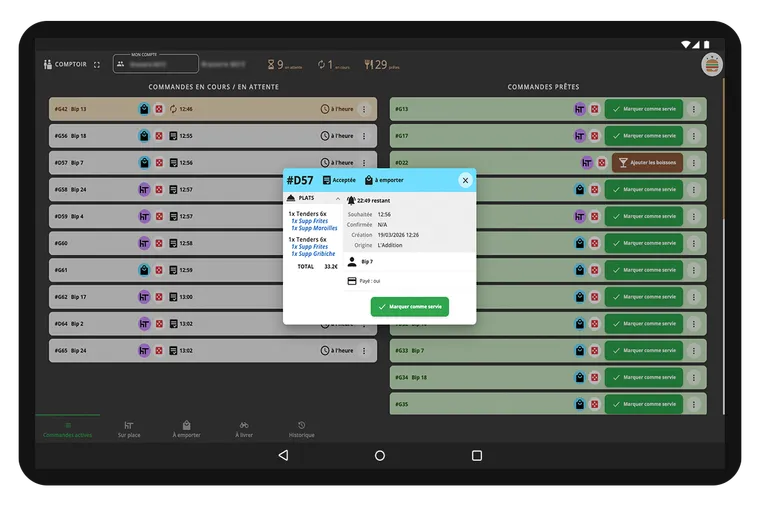

Order ready in the kitchen? The counter is informed, can check the order and add drinks and desserts to the tray or the bag. No more mistakes, no more friction.

Key features of the counter screen

Discover TicknCook
with our free demo mode
Test the kitchen screen, handle orders and see in 5 minutes whether TicknCook is right for your restaurant.
Launch my free demoNo credit card • No commitment • No sales calls • No spam
You decide whether to continue the adventure with us ;)
They trust us
The counter screen helped us smooth out counter service. At peak time we stay in control and no customer waits without knowing.
Very intuitive — it fitted perfectly into our online and in-store ordering process.
Need more information?
Want a demo?
We answer you directly on WhatsApp — click the button or scan the QR code with your phone.
Because at TicknCook we like to keep things simple and human ;)