TicknCook vs Square KDS: which kitchen display for your restaurant?

You use Square and want to get rid of paper tickets in the kitchen. Square KDS looks like the obvious choice, but it is not the only one. TicknCook also connects to your Square POS, and goes further: it runs on any screen, shows ready orders to your customers and prints labels the moment a dish is ready.
Here is an honest, side-by-side comparison.

Start your free trial
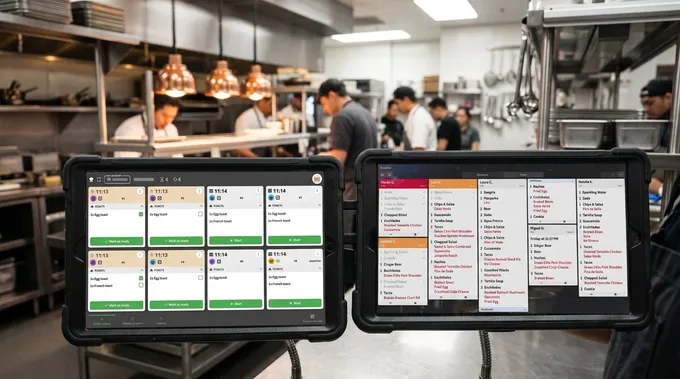
Restaurant kitchen during service, with TicknCook and Square KDS running on two tablets side by side above the pass

Which one is right for you?

TicknCook is made for you if…

  • You want to use the screens you already have: iPad, Android tablet, TV or computer (Windows, Mac)
  • Your customers pick up at the counter and you want a screen that shows and calls ready orders
  • You print labels or bag tickets and want them printed the moment the dish is ready
  • Your dishes go through several stations (prep, oven, assembly)
  • You take a lot of Uber Eats orders
  • You want to stay free to change POS one day, without having to rethink how your kitchen works

Square KDS is enough if…

  • You run everything on Square and are happy with Android tablets
  • Each order goes from a single station to the counter, with no extra steps
  • You only print order tickets, on a Star or Epson printer from Square's list

TicknCook vs Square KDS, feature by feature

The features that make a difference during service, explained in plain words.

FeatureTicknCookSquare KDS
Setup and screens
Screens you can useYesiPad, Android tablet, TV, computer (Windows, Mac): any screen with a web browserPartly, or with limitsAndroid tablets only: the iPad app was switched off in 2026
Connection to your Square POSYesOrders arrive automatically. We set it up with you within 24 hoursYesBuilt in
Works with other POS systemsYesZelty, SumUp, L'Addition, Last.app and more: you keep TicknCook if you change POSNoSquare POS only
In the kitchen
Each station sees only its own dishesYesGrill, cold station, bar: each screen shows what it has to makeYesSet up screen by screen
An expo screen to put orders togetherYesThe pass screen shows which dishes of each order are readyYesExpeditor mode
Total of each dish to prepareYes"8 burgers, 5 fries" at a glance, grouped by categoryYesAll-day counts
Dishes that go through several stationsYesPrep steps: each station validates its step, then the next one takes overNoA single step: prepared, then sent to expo
Courses for table serviceYesStarters, mains and desserts show up in order, as your POS sends themYesSupported with Square for Restaurants
Customers and delivery
A screen showing ready orders to customersYesIncluded: plug a TV into the dining room, ready orders show up and flashNoNeeds a separate third-party app
Order numbers called out loudYesThe customer screen announces each ready order by voiceNoNot available
Text message when the order is readyNoNot available, the customer screen does this job in the restaurantYesFrom the expo screen, if the customer left their number at the till
Advanced Uber Eats order managementYesDirect connection: courier arrival time, orders grouped by courier, store paused from the kitchenPartly, or with limitsThrough Square's delivery integrations, depending on your country
Printing
Printers you can useYesEpson, Zebra, Seiko, Star, Bixolon and many morePartly, or with limitsA short list of Star and Epson models
Automatic printing when the order is readyYesThe ticket or labels print as soon as the cook marks the order readyNoTickets print when the order reaches the kitchen, or by hand
One sticky label per productYesName, options and order number on each item, for bags, cups and boxesPartly, or with limitsOnly with Star sticky-label printers
Follow-up and support
Kitchen statisticsYesPrep times, late orders, best sellers and busiest hoursYesReports in the Square Dashboard
Help when you need itYesReal people on WhatsApp, and setup included at no extra costSquare help center and customer support

Comparison based on Square's public help pages and prices, checked in November 2026. Square's features and prices vary by country and plan. Spotted something out of date? Let us know.

What TicknCook does better

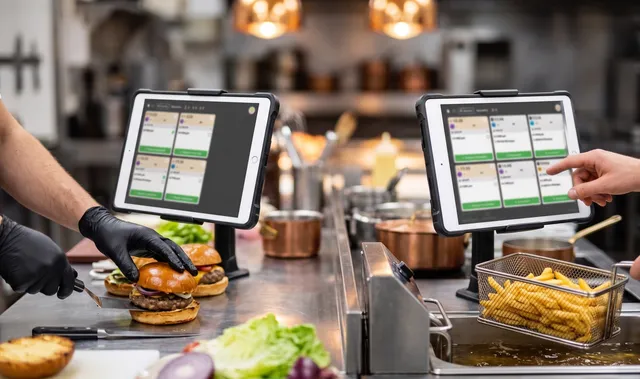
Several tablets running TicknCook in a restaurant kitchen

Keep the screens you already have

Square KDS only runs on Android tablets, and its iPad app was switched off in 2026. TicknCook runs in a web browser: your iPads, an Android tablet, a TV above the pass or a second-hand computer all work. No forced hardware change, and you can mix screens from one station to the next.

Discover the kitchen screen
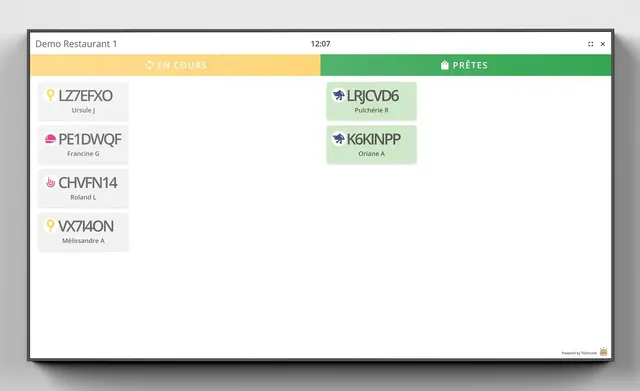
TicknCook customer screen showing orders in progress and ready orders

A screen that calls your customers

Put a TV in the dining room: orders in progress and ready orders show up live, ready ones flash, and the screen can announce each order number out loud. Customers stop crowding the counter, and your team stops answering "is mine ready?". Square KDS has nothing built in for this.

Discover the front-of-house screen
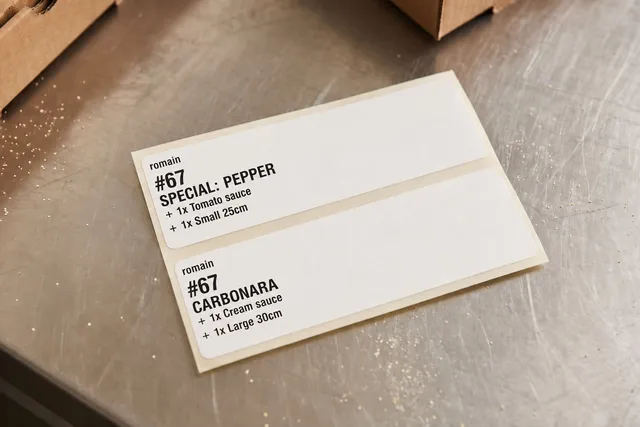
Sticky labels printed by TicknCook, one per pizza, next to pizza boxes

Labels printed the moment it is ready

When the cook marks an order ready, TicknCook can print the full ticket, or one sticky label per product with its name, options and order number: perfect for bags, cups and pizza boxes. With Square KDS, tickets print when the order reaches the kitchen or by hand, and only on a short list of printers.

Discover ticket printing

Dishes that go from one station to the next

A pizza goes from dough to oven to topping, a burger from grill to assembly. With prep steps, each station sees its step at the right time, validates it, and the next station takes over. The order is only ready once every step is done. Square KDS stops at a single step.

Discover prep steps

All your orders, whatever your POS

TicknCook works with Square today and with many other POS systems tomorrow: changing POS never means changing kitchen screens. Connected directly to Uber Eats, it also shows when the courier arrives, groups the orders picked up by the same courier, and lets you pause your store from the kitchen during a rush.

Discover platform integrations

And everything that makes life easier

Real people on WhatsApp

No chatbot, no ticket queue: there is always a human to answer you.

Up and running in 24 hours

Connect your Square account and we set up your screens with you, at no extra cost.

Each screen in its own language

English at the counter, Spanish at the grill: each screen can be set to its own language.

The result? Your Square POS, with a kitchen display that adapts to your restaurant, and not the other way round.

Restaurant owners talk about TicknCook

Ça change tout dans une cuisine , et le support que ce soit technique ou commercial est extrêmement dispo ! Merci

EdgarNossa

Equipe professionnelle, disponible et à l'écoute. Merci pour votre accompagnement . Et votre logiciel est juste TOP! Toute l'équipe l'a adopté, c'est super!

LindaLe Piment

Nous utilisons leur système KDS depuis quelque temps et nous en sommes très satisfaits. L’installation a été simple et rapide, et l’équipe est facilement joignable et vraiment professionnelle. Je recommande.

OsamaChicky'z

Been using TickNCook for our outlets for the past 6 months and it's the best tool we've ever could asked for. From the inputting of orders, integration with food apps and managaing the orders in the kitchen...TickNCook makes our operation run smootly!

AlexYufu

TicknCook has a clean, intuitive interface that makes kitchen operations easier to manage. What we appreciate most is that their team is open to feedback and willing to make adjustments when it makes sense — that kind of flexibility is rare and super valuable.

BeatrizHideout

Très satisfait de TicknCook ! L’intégration avec mon logiciel de caisse fonctionne parfaitement. Les statistiques sont complètes et très utiles, et l’équipe est extrêmement réactive. Grâce à l’application, j’ai simplifié mes bons de fabrication et réduit considérablement ma consommation de papier. Un vrai gain de temps au quotidien. Je recommande vivement ! ⭐⭐⭐⭐⭐

AlbanArcus Corner · Annecy

FAQ

Does TicknCook work with my Square POS?

Yes. Your Square orders show up automatically on your TicknCook screens. Create your account on app.tickncook.com/sign-up, message us on WhatsApp and we connect your Square account with you, within 24 hours. More on our Square page.

Can I keep my iPads?

Yes. TicknCook runs in the web browser of any tablet or screen, iPad included, so the iPads you used with the old Square KDS app keep working.

How much does TicknCook cost?

29 euros (excl. VAT) per month and per screen, and if you take 2 screens, the third one is on us. 15-day free trial, no setup fees and no commitment. See our pricing.

Do I need new hardware?

No. TicknCook runs on any tablet, touch screen, TV or computer with a web browser and an internet connection. We don't sell hardware, but we gladly help you choose it.

Which printers work with TicknCook?

Epson for tickets (the TM-m30III is our pick), Zebra ZD421 and Seiko SLP721RT for sticky labels, and many other models. See the full list of compatible printers.

Is switching complicated for my team?

Not at all: your team simply taps orders when they are done. Most kitchens are up and running within a few hours, and our support is always one WhatsApp message away.

Discover TicknCook
with our free demo mode

Test the kitchen screen, handle orders and see in 5 minutes whether TicknCook is right for your restaurant.

Launch my free demo

You decide whether to continue the adventure with us ;)

Need more information?
Want a demo?

We answer you directly on WhatsApp — click the button or scan the QR code with your phone.

Because at TicknCook we like to keep things simple and human ;)

Talk to us on WhatsApp
TicknCook Customer Support
QR code to contact TicknCook support on WhatsApp