Log in
 Help
Help Contact
 English
 Français
 Español

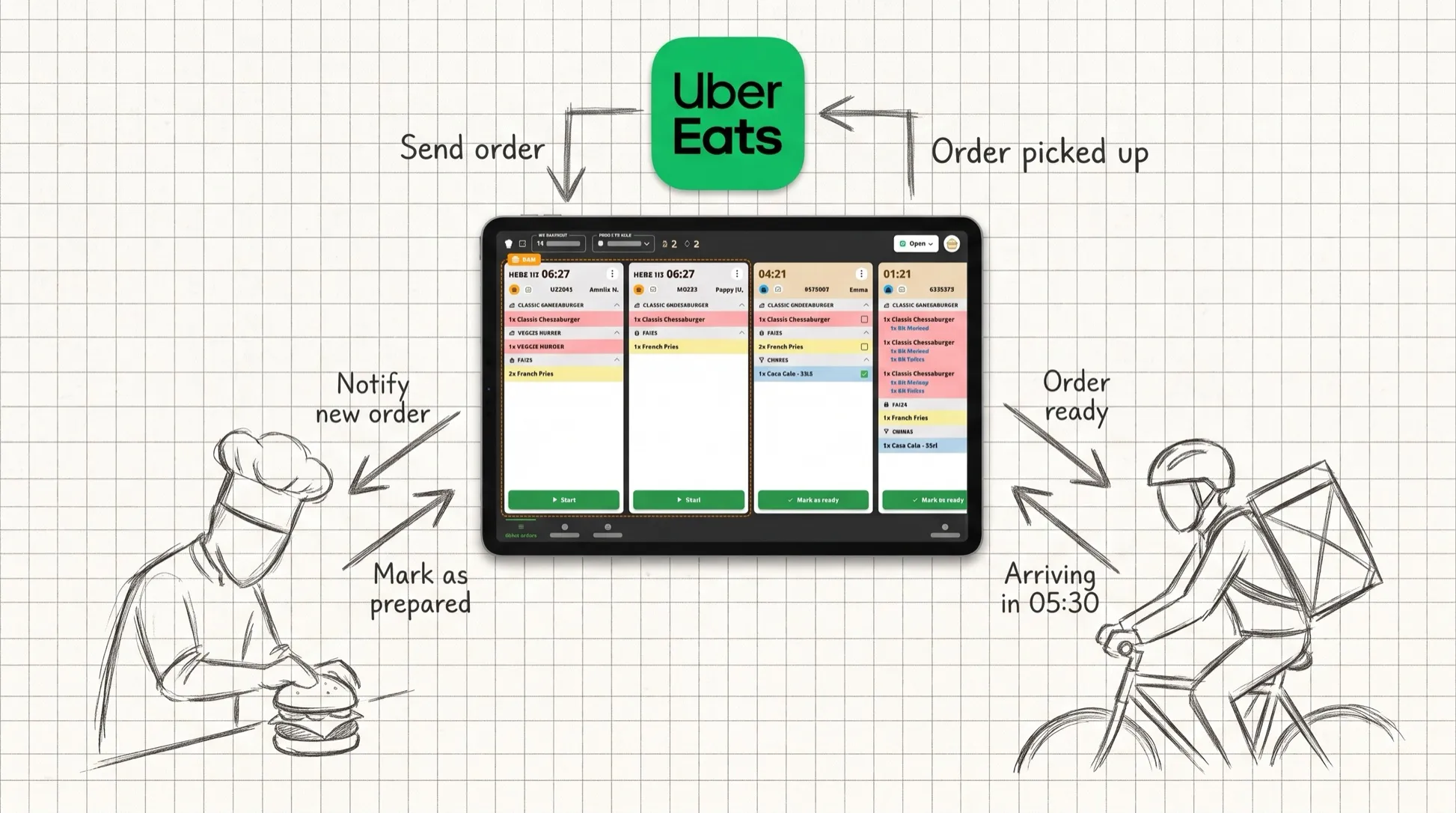
Uber Eats brings in the orders. The KDS (Kitchen Display System) organises their preparation. But how do the two work together?
When a restaurant starts receiving a lot of delivery orders, one question comes up quickly: how do you get Uber Eats orders perfectly integrated into the way the kitchen runs?
That’s where the KDS (Kitchen Display System) comes in. An Uber Eats KDS displays and manages the platform’s orders directly on the kitchen screen, so the team can prepare them without juggling paper tickets, the POS and the Uber Eats tablet.
But depending on the type of integration used, the possibilities can be very different.
What is a KDS?
KDS stands for Kitchen Display System.
In concrete terms, it is a touch screen that replaces paper tickets and lets the team see the orders to prepare.
An order comes in: it automatically appears on the touch screen. The team prepares it, validates the items, then the order. Finally, the order moves to the completed status.
The KDS thus becomes the control centre of production in the kitchen.
The heart of your restaurant isn’t its POS, it’s its production!
How do you connect Uber Eats to a KDS?
There are several ways to get Uber Eats talking to the kitchen.
First option: go through the POS system
In this setup, Uber Eats is connected to the restaurant’s POS.
The Uber Eats order lands in the POS, then is passed on to the KDS.
It is an efficient way to centralise orders when the restaurant already uses a compatible POS.
Second option: connect Uber Eats directly to the KDS
With a direct integration between Uber Eats and the KDS, orders can be sent straight to the kitchen screen.
This is how TicknCook works.
And this direct connection makes it possible to go further than simply passing the order along.
What can a direct Uber Eats integration bring?
Orders land directly on the kitchen screen
No more constantly checking the Uber Eats tablet to find out which orders are pending.
Orders are integrated into the kitchen’s production flow.
The team works from a single tool.
Courier information can flow into the KDS
This is one of the main advantages of the direct connection.
TicknCook can retrieve information about couriers, including their estimated arrival time.
The kitchen can therefore adapt its preparation to the courier’s expected arrival. The KDS then answers the question: “which order needs to be ready right now?”
Orders can be grouped
When several orders are assigned to the same courier, they can be grouped together to make them easier to prepare.
The kitchen gets a clearer view of the batch of orders to prepare.
The restaurant can manage its store from the KDS
With TicknCook, some actions related to the Uber Eats store, such as busy and snooze modes, can also be managed directly from the kitchen screen.
Handy when the service is saturated. No more hunting for another tablet in the middle of a rush.
To go further, find out why you should connect your KDS directly to Uber Eats.
Uber Eats KDS: what’s in it for your restaurant?
A KDS connected to Uber Eats is especially valuable when order volume grows.
You need to:
- prioritise orders;
- prepare them in the right order and at the right pace;
- synchronise production with courier arrivals;
- keep orders from piling up;
- limit waiting time;
- keep the kitchen flowing during rushes.
That is exactly what a KDS is for.
And if your main goal is to reduce errors and improve customer satisfaction through better order organisation, read our article How to manage Uber Eats orders in the kitchen to improve customer satisfaction.
What if you use several platforms?
Uber Eats is usually not the only source of orders.
A restaurant may also receive orders from Deliveroo, kiosks, its website or its Click & Collect.
The point of a KDS is then to centralise these flows in the kitchen.
With TicknCook, orders can be grouped on the production screens so the team no longer has to manage each channel separately.
Uber Eats KDS: the goal isn’t just to go digital
Moving from paper tickets to a screen is already progress.
But the real value of a KDS connected to delivery platforms lies elsewhere: connecting orders to the reality of production.
From the customer placing the order to the courier handing it over, even though the process is now fully digital, the real challenge is that everyone has to move at the same pace.
It is this synchronisation of production that turns a simple kitchen screen into a true tool for steering the service.
Looking for a KDS connected to Uber Eats?
Discover TicknCook and try your future kitchen display free for 15 days. No commitment and no credit card required.
Do you use Uber Eats and handle a high volume of orders? See in 5 minutes how TicknCook can synchronise your kitchen with your deliveries. 15-day free trial. No commitment.